Integration
AI calling + two-way sync for Follow Up Boss
Native integration. No Zapier, no APINation, no middleware subscription. High iQ talks to Follow Up Boss directly.
Follow Up Boss is the CRM most large real estate teams standardise on, and it is unusually honest about what happens to a lead: the timeline shows every call that was never made. High iQ closes that gap by dialing the lead within seconds of it landing in FUB, then continuing to work it on voice, SMS and email for as long as it takes.
The integration is event-driven rather than a nightly file push. When a lead is created, reassigned, or changes stage in Follow Up Boss, High iQ hears about it and adjusts what the agent says next. When the agent finishes a conversation, the summary, recording link, disposition and next step are written back onto the FUB contact before your agent has finished their coffee.
Because FUB teams live inside lead flow rules and action plans, High iQ is built to cooperate with them, not fight them. Assignment respects your round-robin or weighted rotation, tags follow your existing naming, and a per-disposition pause rule stops the AI the moment a human takes over, so nobody double-calls a lead that just answered your ISA.
Where High iQ fits among Follow Up Boss integrations
Follow Up Boss lists more than 250 integrations across categories like Automation, Lead Engagement, Nurture and Prospecting. Most of them move data. High iQ is in a smaller group that acts on it, placing the call, holding the conversation, and writing the outcome back. The High iQ Follow Up Boss integration connects natively through the Follow Up Boss API, so it does not require Zapier or any other connector to sit in between.
How it fires
What starts a conversation
Leads come into High iQ through Inbound Rules: a trigger, an optional condition, and the AI agents you want to hand that lead to. The integration is event-driven, not a nightly sync.
Trigger Tag added to Contact·Condition Tag equals "New Facebook Lead"
New Online Lead Voice AI + SMS AI
Trigger Moved to Pond·Condition Pond equals "Nurture Pond"
Long Term Nurture Voice AI + SMS AI + Email AI
What syncs
Everything High iQ writes back into FUB
Notes with call summary + recording
Every conversation writes a note on the FUB contact: what the lead said, what the AI committed to, and a link to the recording and full transcript.
Call logs
Each attempt is logged as a call activity with outcome and duration, so your FUB call reporting reflects reality instead of only human dials.
Tasks with round-robin or weighted assignment
Booked appointments and hot handoffs create tasks assigned by your existing rotation rules, with due dates that match the promise made on the call.
Tags
Intent, source, campaign and objection tags are applied using your existing FUB tag names.
Stage
The contact advances through your Follow Up Boss pipeline stage automatically, based on the disposition the AI recorded on the actual conversation.
Dispositions
Every call is auto-dispositioned from the actual conversation: Appointment Set, Warm Transfer, Follow Up, No Answer, Re-Attempting, Long Term Nurture or Opted Out. The disposition drives the writeback, so the CRM reflects what was said rather than what someone remembered to log.
AI power dialer for your team
High iQ includes a power dialer your human agents use directly: script builder, one-click objection handling, live transcription, AI-written notes and automatic dispositioning after every call. Those calls log to the Follow Up Boss timeline the same way the AI agent's calls do, so your reporting covers both.
Event example
Appointment set: what writes back
A single conversation outcome, and every field it touches in Follow Up Boss.
- 01Note added to the Follow Up Boss contact with the call summary and recording link.
- 02Call logged with the outcome 'Appointment Set' and the call duration.
- 03Task created and assigned by round-robin or weighted rotation to the agent covering that area.
- 04Tags applied: appointment-set plus the intent tag from the conversation.
- 05Stage advanced to Appointment Set.
- 06AI paused on that contact so the human owns the next touch.
Receipts
What actually lands in FUB
Two views of the same contact, minutes after one High iQ conversation. Both were written by the AI, not by a person catching up on their logging at the end of the day.
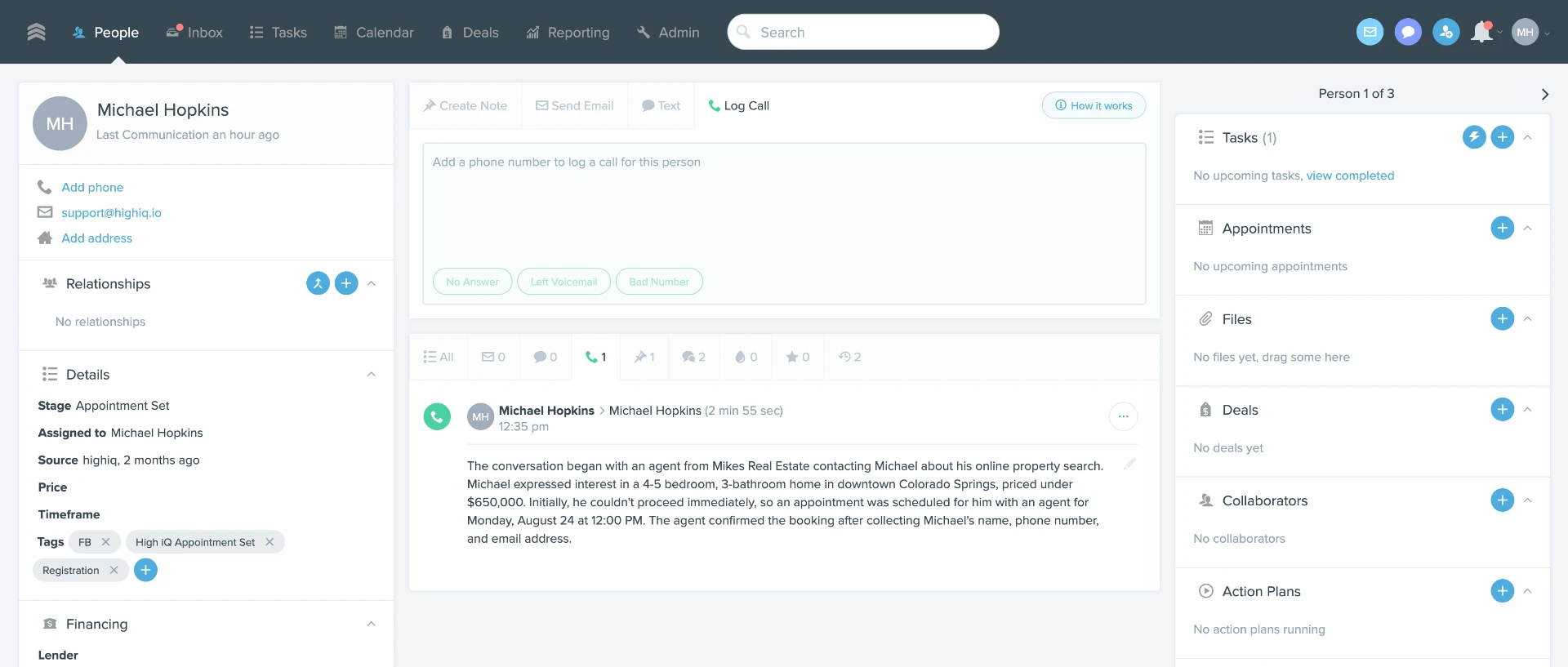
The call gets logged
Every dial lands on the Follow Up Boss timeline as a real call activity
High iQ does not sit beside your CRM, it writes into it. Each attempt is logged as a native Follow Up Boss call with the outcome and the duration, on the contact, in the timeline, in your reporting. That matters most to Zillow Flex and Zillow Premier Agent teams, because Zillow looks at how quickly and how consistently a team responds to and works its leads inside the CRM. Calls the AI makes are recorded work rather than invisible effort, so your activity picture reflects what actually happened.
The note gets written
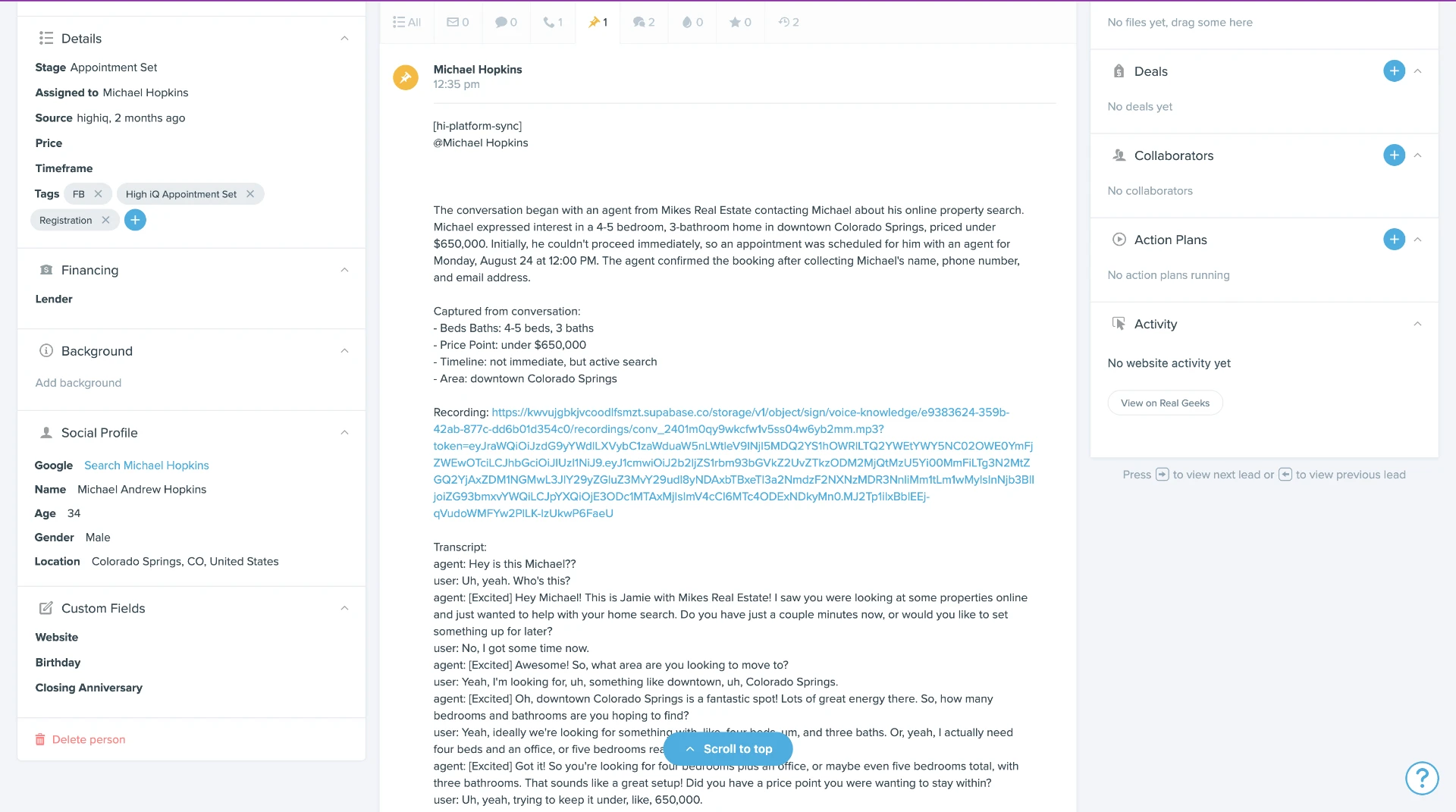
A full note with the summary, the qualifying answers, the recording and the transcript
The activity log tells you a call happened. The note tells you what was said. High iQ writes a summary of the conversation, then the qualifying fields it captured on the call (beds and baths, price point, timeline, area), a link to the recording, and the complete transcript underneath. Stage moves to Appointment Set and the tags go on at the same time. Your agent opens the contact and is briefed before they dial, without listening to anything or asking the lead to repeat themselves.
Setup
How long it takes to connect
- 1
API key
Generate a Follow Up Boss API key from Admin → API. Paste it into High iQ.
- 2
Set your Inbound Rules
Choose which leads the AI works, using triggers and conditions from your existing Follow Up Boss tags, ponds and stages.
- 3
Configure dispositions
Decide what each conversation outcome writes back, and how tasks are assigned.
- 4
Go live
Turn on the agents. First lead gets called within the minute.
Under five minutes to connect. Inbound rules, tags, dispositions, stage writeback and assignment rules are configured against your live Follow Up Boss account by our team during White Glove Onboarding, so you don't do this alone.
What it doesn't do
Where the integration stops
High iQ doesn't replace Follow Up Boss.
It's a layer on top. Your CRM stays the system of record and your team keeps working where they already work.
Recordings live in High iQ, not FUB.
The note on the contact links to the recording and full transcript. This keeps your CRM fast; it does mean the audio is one click away rather than embedded.
We don't rewrite your action plans.
High iQ cooperates with your existing automations rather than replacing them. If an action plan and an AI cadence overlap, you decide which wins.
Custom fields need mapping.
Standard Follow Up Boss fields map automatically. Anything bespoke gets configured during onboarding.
API and webhooks.
If you're building something custom on top, the Follow Up Boss API and webhook events are documented on their side and ours, see the setup guide.
Common question
What AI calling tools work with Follow Up Boss?
Follow Up Boss has an open API and more than 250 integrations, and several AI tools connect to it. High iQ is a native two-way integration: it calls new leads within 60 seconds, works your database on voice, SMS and email, and writes notes, recordings, call logs, tasks, tags and stage changes directly back onto the contact, with no Zapier or third-party connector in between. Setup takes under five minutes with an API key.
Where this fits
Most Follow Up Boss accounts are residential real estate teams, see the full real estate workflow.
AI sales agents for real estate →FAQ
Follow Up Boss + High iQ, answered
How fast does High iQ call a new Follow Up Boss lead?
Under 60 seconds from the lead being created in Follow Up Boss. The webhook fires, the agent dials, and the attempt is logged on the contact whether or not the lead answers.
Does High iQ integrate with Follow Up Boss natively or through Zapier?
Natively. High iQ connects directly to the Follow Up Boss API with real two-way sync, no Zapier, APINation or other middleware, and no separate connector subscription. That also means sync status is visible inside High iQ rather than on a third-party site.
What Follow Up Boss fields does High iQ write to?
Notes with the call summary and recording link, call logs with outcome and duration, tasks assigned by your rotation, tags using your existing tag names, and pipeline stage. Every write is driven by the disposition the AI recorded on the actual conversation.
Will High iQ conflict with my Follow Up Boss action plans and lead flow?
No. High iQ respects your existing lead flow and assignment rules, and per-disposition pause rules stop the AI as soon as a human engages, so a lead never gets called twice in the same minute.
Does High iQ log AI calls into Follow Up Boss for Zillow Flex reporting?
Yes. Every attempt is written to the contact as a native Follow Up Boss call activity with the outcome and the duration, so it appears in your timeline and your reporting the same way a human dial does. Zillow Flex and Zillow Premier Agent teams care about this because Zillow looks at how quickly and how consistently a team responds to and works its leads in the CRM, and AI calls that are never logged do not show up in that picture.
Does the recording live in Follow Up Boss?
The recording and full transcript are stored in High iQ and linked from the note written on the FUB contact, so your CRM stays fast while the audio is one click away.
Which other CRMs does High iQ integrate with natively?
Follow Up Boss, BoldTrail (kvCORE), Sierra Interactive, Real Geeks, CINC, GoHighLevel and Lead Docket, all native two-way, no middleware.
Who sets the integration up?
Our team does it during White Glove Onboarding: field mapping, tags, stages and assignment rules are configured against your live Follow Up Boss account before any agent goes out.
Does High iQ include a dialer for Follow Up Boss?
Yes. Alongside the AI agents, High iQ includes a power dialer your team uses for manual calling, with a script builder, one-click objection handling, live transcription and AI-written notes. Every call, human or AI, logs to the Follow Up Boss timeline with outcome, duration and a recording link.
How do I connect Follow Up Boss to other apps?
Follow Up Boss has an open API and a public integrations directory covering more than 250 tools. Some connect natively, others through Zapier or a similar connector. High iQ connects natively over the Follow Up Boss API: you generate an API key in Admin → API, paste it into High iQ, and set your inbound rules. Setup takes about five minutes. Full instructions are in the setup guide.